Bubble vs Replit / Lovable: the Official ‘Production No-Code vs Vibe-Code’ Line Is a Layer Map, Not a Stack Swap, and Not Reverse
A practical guide for non-technical founders: how I’d pair fast prototyping in Lovable or Replit with visual maintainability in Bubble, what Universal Import and MCP actually deliver, and why none of this is a reason to panic-swap your MVP stack.
You have a startup idea and zero engineering background. The job is simple: validate the concept, get real user feedback, or land initial investment, fast. Lately my feed is full of “vibe coding”: Lovable, Replit Agent, and v0 promise a running application in minutes from a natural language prompt.
At the same time, Bubble has drawn a deliberate line in its public messaging, across 2025–2026 blog posts, comparisons, and founder AMAs. Their point: the market is not one bucket of “AI builders.” Vibe coding (generating underlying source code) and visual development / production no-code are fundamentally different things. Worth reading next: How to Read bubble.io careers.
If you’re a non-technical founder, this is no reason to abandon your tools or panic-swap stacks. I read it as a layer map. It shows where each tool is actually strong.
The Layer Map: Prototype Speed vs. Production Iteration
Bubble’s official comparisons with Replit and Lovable focus on one trade-off: what happens to your product after the first draft.
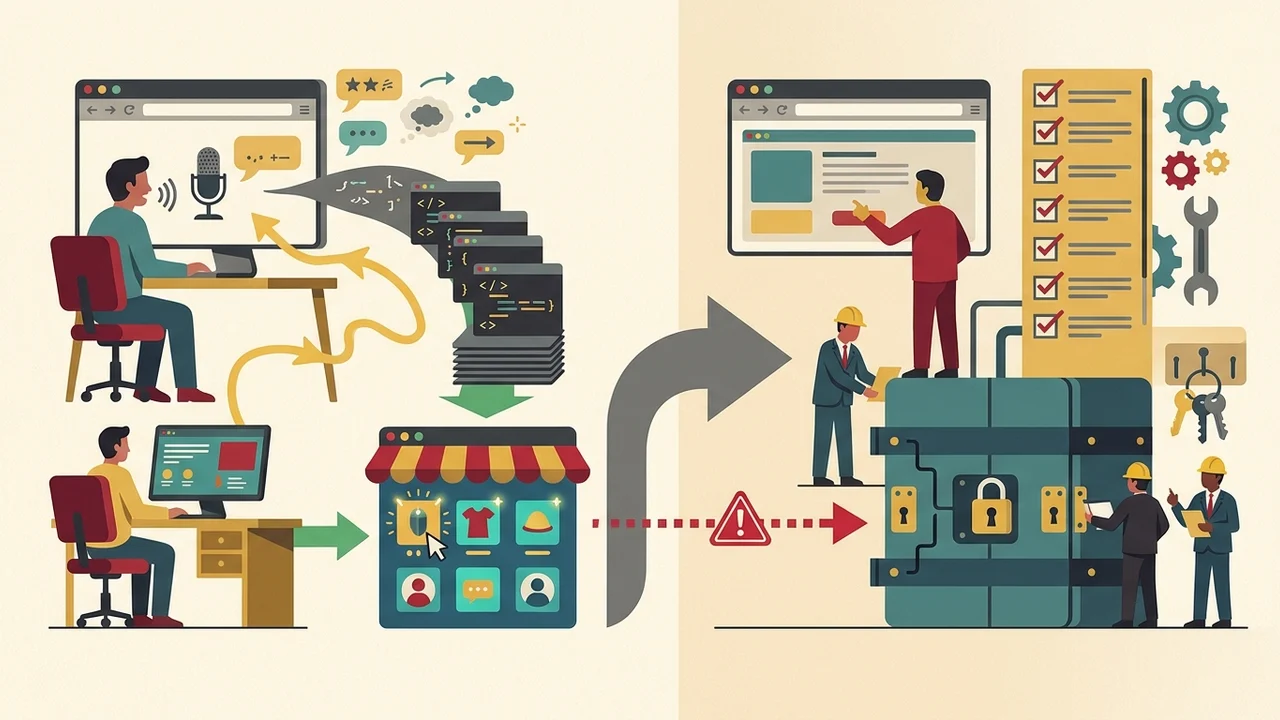
- The Prototyping Layer (Vibe Coding: Lovable, Replit Agent, v0)
- How it works: You describe features in natural language. AI generates standard source code behind the scenes.
- The strength: Very fast prototypes. You can have a clickable interface ready for feedback in an afternoon.
- The snag for non-engineers: Logic, database structures, and backend rules live in generated code. Once real users report edge-case bugs, or you need custom role-based permissions, you’re staring at an opaque codebase. Patching it with prompts gets more fragile every time.
| Name | What it is for | What it is not for |
|---|---|---|
| Prototyping Layer (vibe coding: Lovable, Replit Agent, v0) | Very fast prototypes; a clickable interface ready for feedback in an afternoon | Sustained iteration when logic, database structures, and backend rules live in opaque generated code |
| Natural-language → generated code | Describing features in plain language while AI produces standard source code behind the scenes | Non-engineers owning backend rules, DB structure, and logic without facing an opaque codebase |
| Prompt-based patching (after real use) | — | Fixing edge-case bugs or custom role-based permissions; patching with prompts grows more fragile over time |
- The Production Layer (Production No-Code: Bubble)
- How it works: Design, data types, Privacy Rules, and Workflows stay visual, transparent, and directly editable in the platform’s editor.
- The strength: Maintainability and governance without engineering headcount. Hosting, database management, and platform security are handled out of the box. I can see my workflows and inspect my data tables without reading code.
- The on-platform hybrid: Bubble also positions its own visual AI generation, “vibe code without the code.” It uses AI generation but outputs native visual elements, not opaque code blocks.
The Post-Prototype Bridge: Universal Import and Bubble MCP
If you already built a first prototype in Lovable, Replit, v0, Base44, or Claude, you don’t necessarily have to scrap it and start over.
Bubble’s official bridge for the post-vibe-code stage is two mechanisms, both in beta:
- Universal Import (beta): Rolling out gradually. You upload exported ZIP archives or HTML files from supported platforms (Lovable, Replit, v0, Base44, Claude, or a generic ZIP) directly into Bubble. What you get is a standard Bubble application in the visual editor.
- Bubble MCP (beta): Connects external AI assistants (such as Claude, via the Model Context Protocol) to inspect and build native visual elements, workflows, and data types directly inside Bubble. It’s for in-editor construction and modification, not deployment. Same topic: Figma’s ‘Fast Then Slow’ and.
A realistic take: This is a migration pipeline, not magic. Bubble’s documentation says plainly that exports rarely include live database contents, secret API keys, or external service integrations. You still wire backend connections and check workflows by hand. What you end up with, though, is a native visual application a non-technical team can maintain on its own.
This Is Not Reverse.dev
Universal Import is easy to confuse with Reverse.dev, an experimental project from Bubble’s Innovation Lab. They go in opposite directions:
- Reverse.dev visualizes and edits an existing GitHub-backed codebase and syncs edits straight back to the Git repository.
- Universal Import & MCP take code exports and convert them into Bubble’s native, visual-first application model. A closer look: Bubble Reverse: GitHub as the.
My Rules for MVP Builders
- Don’t abandon a working stack. If you’re already building on Bubble and you understand visual logic, keep shipping. You already have managed hosting, security rules, and a scalable database.
- Use vibe tools as quick concept specs. When you need to show a customer a visual flow or test a layout within hours, vibe coding is great at that first draft.
- Move to visual production when governance matters. Once customer data, authentication, and ongoing feature work are in play, move into Bubble, either by hand or through Universal Import. That way you keep full ownership of your application without writing code.
The point of an MVP is to prove customers want it and start making revenue. Chasing development buzzwords doesn’t get you there.