n8n Assistant 2.35+: preview Agents, MCP, and one-line Docker next to Bubble
A practical guide for non-technical founders and vibe coders: how n8n 2.35+ simplifies self-hosted AI automation alongside Bubble, what works today, and how to avoid timeout traps.
When launching an MVP without an engineering background, your primary focus is speed: validating the concept, getting early customer feedback, or presenting traction to investors. Bubble is an exceptional no-code tool for building interfaces, managing authentication, and iterating on your data model. However, running multi-step AI chains, document parsing, or scheduled web scrapers directly inside Bubble workflows can quickly drain Workload Units (WU) or trigger execution limits. A closer look: AI Coding Benchmarks: How to. Worth reading next: Using an AI Coding App. Worth reading next: Free ai coding tools next.
For solo founders, running a self-hosted automation engine like n8n as a companion «sidecar» backend has become a standard architectural pattern: Bubble handles the frontend, while n8n manages heavy logic. With release 2.35+, n8n has introduced several features that make setting up this stack significantly faster for vibe coders and non-technical builders. Same topic: Claude Code 2.1.287: What Non-Technical. Worth reading next: Who Should Build Your Bubble.
What n8n 2.35+ Brings to the Table
Several updates in this release directly impact rapid MVP development:
- Renamed to n8n Assistant: Replacing the earlier AI Workflow Builder, n8n Assistant is a canvas-native helper. You can build, modify, test, and debug workflows using natural language prompts. It prompts you for required credentials and helps troubleshoot broken nodes directly on the canvas.
- One-Line Docker Setup: Instead of deciphering complex server guides, self-hosting is now streamlined via
curl -fsSL https://get.n8n.io | sh. It requires Docker with thedocker composev2 plugin. The installer creates a local./n8ndirectory running on port5678with SQLite and bundled sandbox and web-search services. - Autonomous Agents (Preview): The assistant can scaffold agentic architectures where an LLM dynamically selects tools and branches based on input data rather than following rigid, static paths.
- Three Layers of MCP: Model Context Protocol integration appears across the stack: connecting external MCP servers from a registry directly inside the Assistant chat, exposing your n8n instance as an MCP server via settings or
N8N_MCP_ACCESS_ENABLED, and native workflow nodes (MCP Server Trigger and MCP Client Tool).
What a Solo MVP Founder Can Test Today
- Vibe Coding Backend Endpoints: Instead of configuring JSON payloads and complex routing rules manually, you can tell n8n Assistant: «Create a webhook that accepts text from Bubble, summarizes it with OpenAI, and returns a JSON response». The assistant drafts the workflow on your canvas.
- Cost-Efficient Execution: Running heavy AI transforms on your own VPS keeps Bubble Workload Units lean, giving you predictable monthly infrastructure costs during early validation.
- Bring Your Own API Keys: On self-hosted Community instances, you are not bound to platform credit systems; you authenticate directly with your model provider (OpenAI, Anthropic, etc.).
Critical Gotchas and Preview Constraints
To build a dependable MVP, keep these technical boundaries in mind:
- Preview Means Always Verify: n8n Assistant and Agents are explicitly in preview. They can misconfigure node parameters or hallucinate settings. Always test generated workflows with sample data before routing real user requests through them.
- The Bubble API Connector Timeout (Error 524): This is the most frequent stumbling block. Bubble's API Connector enforces strict timeout boundaries (~30 to 45 seconds). If your n8n agent runs multiple LLM calls and takes 60 seconds, Bubble drops the connection and shows a failure. Solution: Use n8n’s
Respond to Webhooknode right away to return an immediate200 OKor confirmation token, then deliver the final output back to Bubble asynchronously using Bubble’s Workflow API (Backend Workflows). - Docker-Only Requirement: npm-based installations are not supported for Assistant. n8n documentation notes a broader shift away from npm toward Docker leading into n8n 3.0 (scheduled around October 2026).
- Manual Agents Flag: Agent capabilities are rolling out gradually. Enabling them on self-hosted setups often requires setting
N8N_ENABLED_MODULES=instance-ai,agents. Note that self-hosted Enterprise support for agents is not ready yet, queue mode is unsupported, and channel integrations require a publicly accessibleWEBHOOK_URL. - Sandbox Hardening: The bundled sandbox included with the one-line installer is designed for quick prototyping. Production deployments running arbitrary code should follow official guidance toward dedicated execution environments like Daytona.
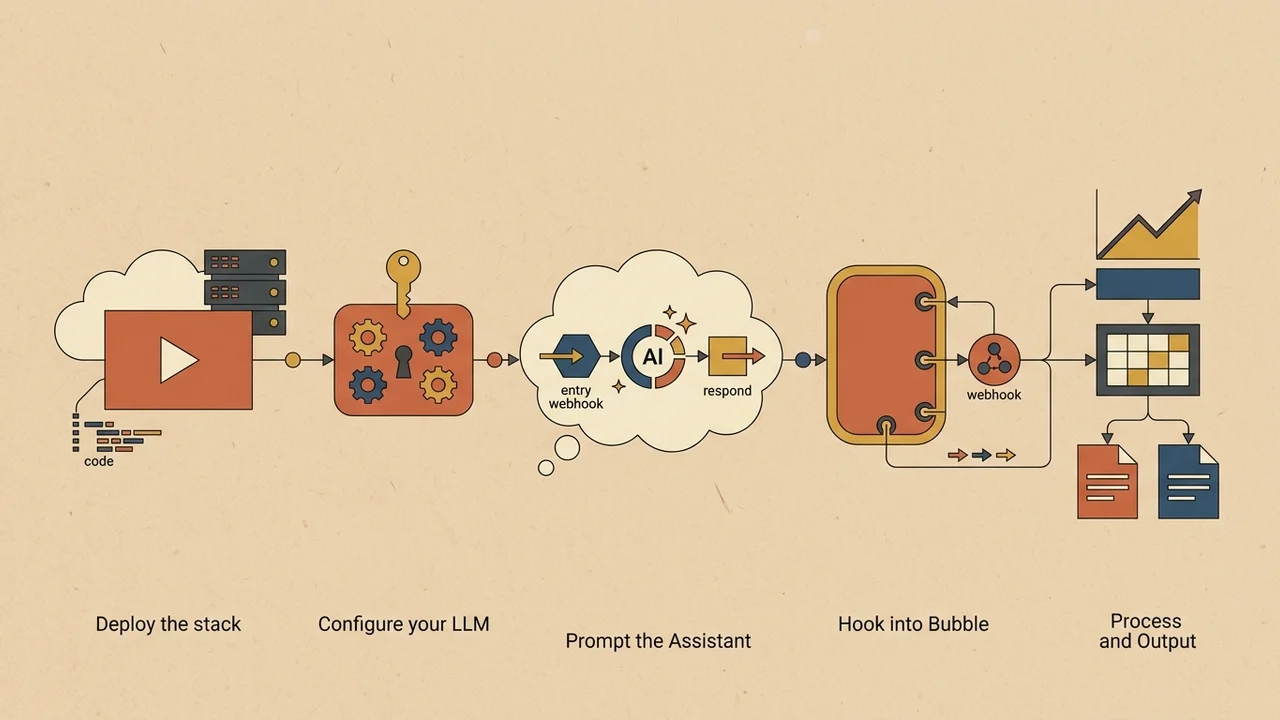
Practical 5-Step Action Plan
- Deploy the stack: Run
curl -fsSL https://get.n8n.io | shon a local machine or a cloud VPS with Docker v2 installed. - Configure your LLM: Add your model provider API key in the n8n UI credentials or
.envfile. - Prompt the Assistant: Request a workflow with a Webhook node, an AI step, and a
Respond to Webhooknode. - Hook into Bubble: Add a new API call in Bubble's API Connector set to
Action/POST, pointing to the n8n test webhook URL. - Verify and decouple: Test synchronous responses for quick lookups; if processing takes longer than 15 seconds, switch to an asynchronous callback using Bubble's Backend Workflows.