Orange Builder (30 Sep): AI brand site + DAM as the storefront — the account and data stay in Bubble
On September 30, Orange Logic previewed Orange Builder for generating brand sites directly from a DAM. Here is how non-technical founders can separate AI storefronts from their core Bubble MVP without mixing brand vibe-coding with production data.
On September 30, 2026, at the Orange Logic Summit in New York, the vendor previewed Orange Builder—an AI-native builder designed for brand sites, partner portals, press rooms, and campaign microsites running on governed assets inside Orange DAM. Teams can feed in Figma files, PDFs, creative briefs, sketches, or plain-text prompts; AI agents then build responsive layouts across desktop, tablet, and mobile, requiring explicit human sign-off before anything is published. A closer look: Salesforce Builder Central Beta: Why.
Orange Logic presented internal test timings (such as generating an About page from a PDF in ~2 minutes 20 seconds or an entire Figma-based page in ~9 minutes). These remain unverified marketing claims rather than independent benchmarks. There is no public pricing, general availability timeline, or documented client rollout volume yet; the product is currently in early access for select accounts ahead of an October 7, 2026 webinar. Crucially, the vendor notes this is not a corporate CMS replacement, but a DAM-connected brand experience tool intended to live alongside an existing CMS.
For non-technical founders using no-code and vibecoding to get an MVP live, test market interest, and gather early feedback or investment, this announcement highlights an important architectural boundary.
Storefront vs. Product: Understanding the Categories
When trying to validate an idea rapidly, it is easy to assume that any new AI site builder can host an entire business. In reality, modern tooling falls into three distinct buckets:
- AI Brand Sites + DAM (e.g., Orange Builder): Governed storefronts for marketing assets, press kits, and media portals. They focus on maintaining brand consistency and presenting collateral, not running transactional product logic.
- AI Workspace Sites (e.g., ChatGPT Sites): Lightweight websites or mini-interfaces created via prompts within an LLM workspace, but constrained by beta limits and strict boundaries on live transactional databases.
- Full-Stack No-Code Applications (Bubble): The real engine of your startup, housing your relational database, custom user workflows, privacy rules, and payment gateways. Same topic: 5M+ ChatGPT Sites in 3. Worth reading next: ~700 Bubble mobile plugins and.

There is no native integration between Orange Builder and Bubble. However, adopting this mental model provides a clean blueprint for a startup stack.
What Belongs on the Storefront vs. What Stays in Bubble
To keep development lean and avoid unnecessary complexity, keep your architecture strictly separated:
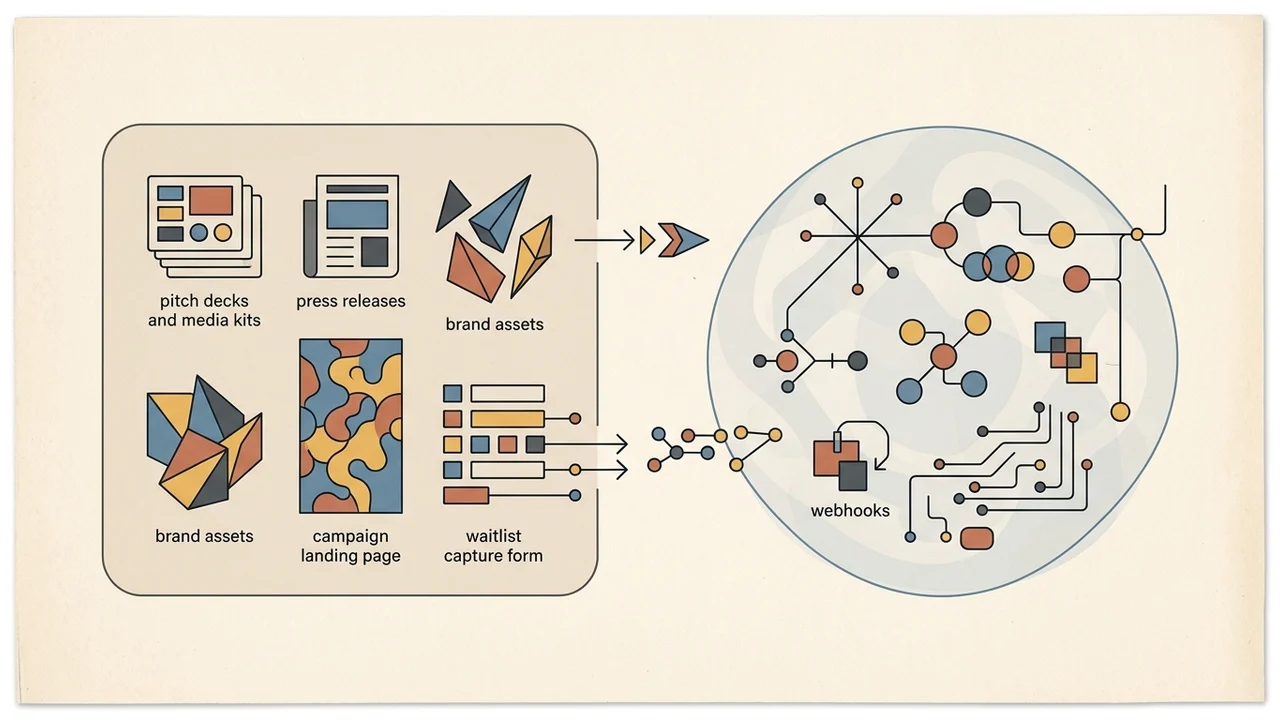
- The External Brand Site / Storefront:
- Pitch decks, media kits, press releases, and high-resolution brand assets.
- Campaign landing pages explaining the problem and solution.
- Early-access waitlist capture forms connected via webhooks or simple form endpoints.
| Content | What it is for | Where it belongs |
|---|---|---|
| Pitch decks, media kits, press releases, and high-resolution brand assets | External brand and media assets | External Brand Site / Storefront |
| Campaign landing pages | Explaining the problem and solution | External Brand Site / Storefront |
| Early-access waitlist capture forms | Waitlist capture via webhooks or simple form endpoints | External Brand Site / Storefront |
 Same topic: OpenAI Agents API (public beta).
- The Core Bubble Application:
- User Authentication & Accounts: Signups, logins, password resets, and role-based permissions.
- Production Database: The actual records your customers manipulate and pay for.
- Billing & Subscriptions: Stripe customer portals, plan limits, webhooks, and invoice generation.
- Data Governance & Privacy Rules: Strict security policies ensuring users can only read and write their own data.
The Vibecoding Trap: Never Run Brand Experiments on Production Data
For founders building without technical backgrounds, two common traps frequently derail early-stage MVPs:
- Do not turn Bubble into a heavy DAM: Bubble's native file storage is designed for application assets, profile photos, and document uploads. Storing uncompressed raw media archives or complex marketing libraries inside your Bubble database will inflate storage costs and degrade app performance.
- Do not mix generative brand plugins with production tables: Vibecoding new landing page styles or dynamically altering UI components with experimental AI plugins should never happen directly inside your production app's database. Keep generative UI experiments on the storefront layer; your production customer tables must remain stable, structured, and protected by strict Privacy Rules.
A Lean Playbook for Your MVP Launch
- Keep the storefront decoupled: Use no-code or AI generators to build a clear, polished presentation of your offer without touching backend logic.
- Focus your Bubble build on one core workflow: Limit your app to the single pain point that users will pay for. Build user signup, the core functionality, and a payment step.
- Connect them with a simple link: You do not need deep API integration on day one. A simple button on your brand site linking to
app.yourdomain.comis all it takes to transition visitors from discovery to onboarding.
Keeping your brand storefront separate from your Bubble application protects your core data and lets you iterate quickly on user feedback.