Bubble AI planning: structured Q&A before app generation, not after
Bubble has replaced static generation with interactive app planning sessions. Here is a practical framework for non-technical founders to lock down user roles, core workflows, and MVP scope before generating a single page.
For non-technical founders and creators testing a new venture through nocode and vibe coding, time-to-market is everything. You need to validate assumptions, gather early customer feedback, or demo a tangible product to initial backers. However, jumping straight into an AI prompt often leads to messy database structures and broken user flows that take longer to debug than to build from scratch.
On 31 August 2026, Bubble introduced a significant upgrade to its Create with AI workflow: app planning sessions. Instead of dumping your prompt into an opaque loading screen or receiving an uneditable static blueprint, you now enter an interactive Q&A process that refines product logic before generating the app.
How the App Planning Session Works
Once you submit your initial concept, Bubble analyzes the assumptions in your description and presents clarifying questions. You can choose from recommended multiple-choice answers or input custom text, adjust user stories, refine the visual vibe, and upload interface reference images.
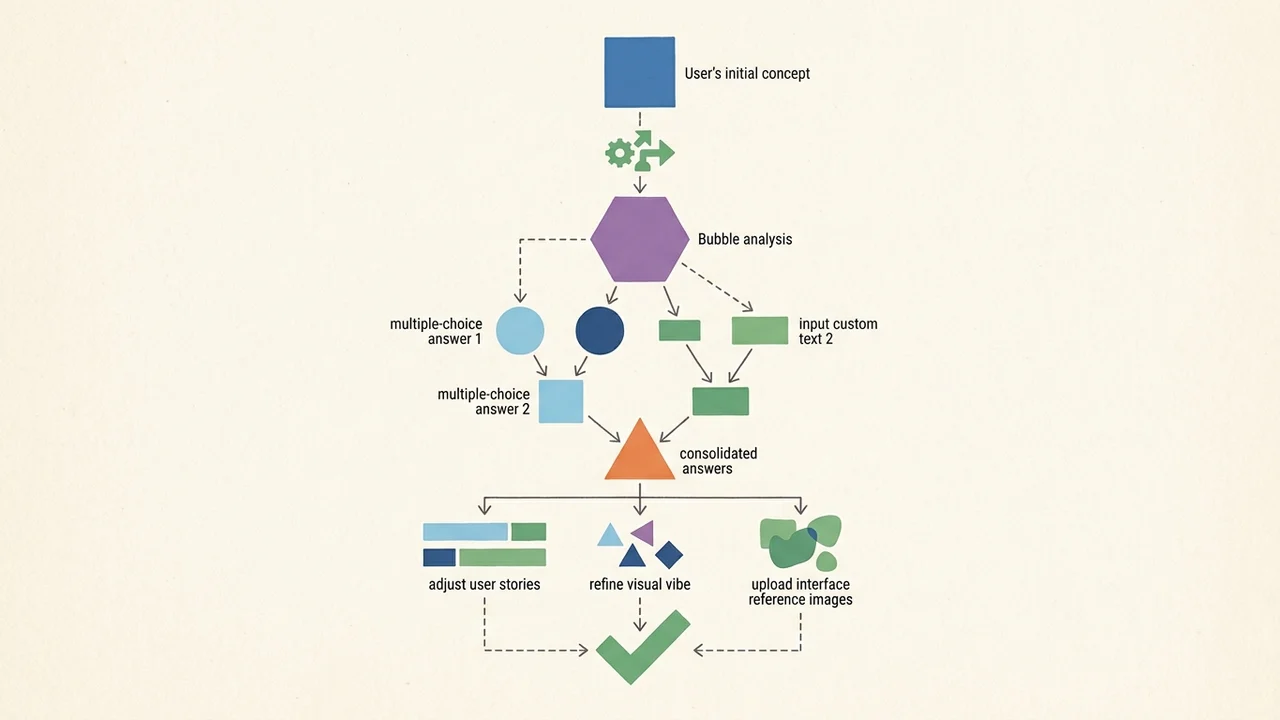
As you respond, the underlying application plan updates dynamically. The interface lets you inspect two dedicated views before committing:
- Features: the prioritized functional scope of the application.
- Scenarios: how different user interactions will unfold across the product.
A Generate button remains active in the top-right corner throughout the entire session. While completing the Q&A is technically optional, bypassing it deprives the AI model of critical operational boundaries.
Documented planning session questions typically center on:
- Feature mechanics: resolving operational edge cases (e.g., whether a booking system handles recurring appointments or one-off sessions).
- Roles and access levels: distinguishing between client, administrator, or team member privileges.
- Visual direction: defining styling parameters and layout references.
Understanding What Bubble AI Does (and Doesn't) Cover
Bubble's official documentation (Generate apps with AI) outlines clear guardrails for prompt design. A strong prompt should cover:
- Application type and primary goal.
- Target audience.
- Core, uncompromised features.
- Visual style.
Critically, the manual warns against pasting deep technical integration specs—such as intricate OAuth flows, custom webhooks, or complex Stripe configurations—directly into your opening prompt. The generation engine is built to synthesize product architecture and user journeys, not to execute low-level third-party wiring in one pass.
Furthermore, the in-product planning session focuses on features and roles; it does not natively plan monetization architecture, subscription tiers, or payment gateway connections. If your goal is to test willingness-to-pay, you must plan your billing approach as a lean operational step rather than expecting the AI generator to assemble full checkout logic automatically.
The Non-Technical Founder's Pre-Generation Pass
To maximize the speed of nocode execution without getting bogged down by architectural debt, follow this repeatable process:
Define Core Roles and Entities First
Before typing your initial prompt, note down your primary user types and the central transaction. Keep your MVP hypothesis tight: if you are testing customer demand, complex multi-tier billing can often be replaced by a simple intake form or manual onboarding during week one.Work Through the Clarifying Questions
Resist the urge to hit "Generate" instantly. Spend three to five minutes answering the AI's clarifying prompts. When asked about user permissions or data recurrence, select the simplest model that allows you to collect feedback. These answers directly shape your database data types and privacy rules.Prune Features and Scenarios
Review the Features and Scenarios tabs before triggering the build. Remove secondary bells and whistles—such as in-app chat, complex badges, or referral systems—that dilute the core value proposition of your MVP.Trigger Generation and Iterate Selectively
Once you click Generate, Bubble constructs an app rooted in explicit user journeys rather than guesswork. From there, you can integrate external payments or fine-tune specific pages using Bubble's visual editor or post-generation AI assistants.
Bottom Line
Speed without clarity is just technical debt created faster. Bubble's app planning sessions provide non-technical builders with an accessible, conversational design review. Taking a few minutes to complete structured Q&A before generation ensures your MVP arrives clean, focused, and ready for actual user testing.