Bubble.io reviews and architectural fit: where it fits and where it doesn't
My honest verdict as a working developer on Bubble.io for founders who need fast MVP validation: how to match project requirements to platform capabilities without getting trapped by hidden trade-offs.
A founder with a new product concept has one job: move fast. Launch an MVP, get early customer feedback, show traction to users or angel investors. For non-technical founders and creators working with no-code workflows, a visual application builder is often the fastest path from idea to working software. That's why I read practical bubble.io reviews closely. They help separate real engineering constraints from marketing enthusiasm. Same topic: What Bubble Really Costs for.
Bubble is not an effortless toy. It's also not an unqualified replacement for a bespoke software repository. It's a hosted, opinionated web application platform with clear strengths and explicit engineering boundaries. Below is the framework I use to decide where Bubble excels, where another stack is necessary, and which trade-offs to weigh before building. A closer look: n8n Assistant 2.35+: preview Agents,.
What Bubble Solves and How It Is Architected
Before I judge fit, I look at what runs beneath the canvas. According to the Bubble Manual, Bubble is an all-in-one hosted environment for building browser-based web applications. It bundles a visual drag-and-drop UI designer, a workflow-based logic engine, a built-in relational database, authentication, scheduled background jobs, and cloud hosting.

Your app runs only on Bubble's infrastructure. You can't export source code or containerize it for self-hosted deployment. External services connect through marketplace plugins, direct REST configurations in The API Connector, or programmatic endpoints exposed via The Bubble API, which covers both the Data and Workflow APIs. Usage and scaling are billed in Workload Units (WU). They aggregate compute across database lookups, server workflows, external API calls, and web traffic.
For an early-stage bubble.io app, this integrated runtime removes months of backend setup, deployment orchestration, and database administration.
Where Bubble Fits Well: Documented Archetypes for Rapid Validation
Bubble works smoothly when a project maps onto its core architectural primitives:
- Multi-Tenant B2B SaaS. Bubble explicitly documents patterns for company and account hierarchies with role-based memberships and subscription billing. If you need an authenticated portal where companies manage isolated workspaces, Bubble is exceptionally fast.
- Two-Sided Marketplaces. Transactional platforms that connect buyers and sellers fit standard Bubble patterns. The documentation covers Stripe Connect onboarding and automated payout routing, so you can collect transaction fees right out of the box.
- Internal Operations Tools & Portals. Custom CRM pipelines, inventory dashboards, fulfillment tracking, employee management portals. When fast iteration matters more than consumer-scale graphics, Bubble gives you a lot of utility for minimal overhead.
- Workflow Automation & CRUD Applications. Systems built around creating, reading, updating, and deleting records, with triggered automations behind them. API workflows run recurring tasks and scheduled background jobs, so you don't manage separate task queues.
- Integration-Centric Business Products. If the app aggregates third-party REST services (AI inference endpoints, messaging services, payment processors) through the API Connector, you can assemble it quickly without running custom backend microservices. Worth reading next: Using an AI Coding App. A closer look: From the AMA: Conversational Generation.
For a non-technical founder who needs to validate market demand quickly, these patterns make it realistic to ship a robust, functional product within weeks.
When Another Stack Is the Better Choice
If you force Bubble into requirements outside its architectural model, you pay for it in operational friction. I'd look at a custom stack in these cases:
- Mandatory Codebase Portability (Self-Hosting). Bubble's documentation on application and data ownership is clear: application logic can't be exported as standalone code. You keep the rights to your data and design, but the runtime stays bound to Bubble. If your team, investors, or enterprise clients require a Git repository that runs on arbitrary cloud infrastructure, Bubble is not a viable match.
- Long-Running or Synchronous Batch Compute. Bubble enforces strict Hard limits, including a maximum workflow execution timeout of 5 minutes (300 seconds). Heavy data transformations, deep recursive batch routines, and long synchronous pipelines have to be split into asynchronous chunks or handed off to an external microservice.
- Deep Device-Level Features. Bubble's Web documentation points out the built-in constraints of the browser sandbox. If your product depends on persistent offline storage, specialized device hardware sensors, or native mobile operating system features, a web-only Bubble architecture will fall short.
- Extreme Scale with Low-Latency Query Guarantees. Bubble sets hard limits on database operations: sorted searches return at most 50,000 records, and child item lists on a record cap at 10,000 entries. Outbound API responses can't exceed 50 MB, and API requests fall under plan-specific rate limits. If you need sub-second queries across millions of rows under high concurrency, you need dedicated database indexing beyond Bubble's shared visual query engine. Worth reading next: Why You Don't Need ai.
The Core Trade-Off Checklist
Before I commit to a build, I go through these operational realities one by one:
1. Platform Lock-In and Data Portability
You can pull your records out at any time with Exporting data as CSV, JSON, or NDJSON files, or read them programmatically through the Data API. Logic is a different story. User flows, frontend conditionals, and backend workflows need a ground-up rebuild if you move to another platform. Bubble does keep an informational discontinuity statement about open-sourcing the engine in unforeseen circumstances. I still plan production roadmaps as if logic portability is zero.
2. Plugin Dependencies and Architecture
Community plugins are quick shortcuts. But paid plugins are licensed per application and don't transfer across sub-apps. Unused plugins still inject assets into page payloads and slow down initial render. For long-term products, I pick the built-in API Connector over a lightly maintained community wrapper for any critical integration.
3. Workload Units (WU) and Performance Tuning
Every database lookup, workflow execution, and payload transfer consumes Workload Units. In Scaling with Bubble, Bubble says it avoids artificial end-user rate limiting. Still, throttling kicks in as you approach operational capacity, and plan-based API request caps stay in force. To keep cost and speed predictable, follow Bubble's Optimization framework: keep searches lean and cut redundant workflows.
4. Data Security: Privacy Rules vs. UI Visibility
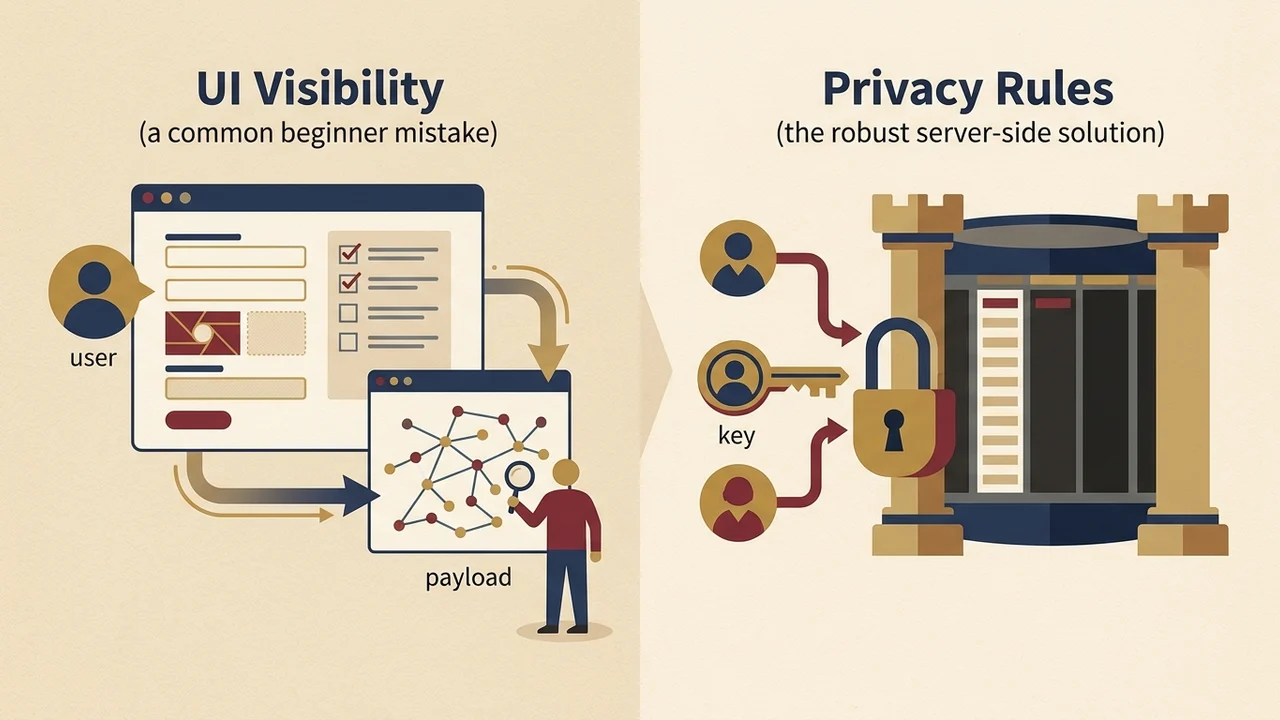
A common beginner mistake is hiding sensitive fields with visual conditionals on the page. In Bubble, the underlying data still shows up in client network payloads. Security has to be enforced on the server through Protecting data with privacy rules. Role-based access control (RBAC) is entirely up to the builder, through user roles and data constraints. Bubble does not ship a turnkey permission schema.
| Method | Use for | Not for |
|---|---|---|
| Visual conditionals (UI visibility) | Hiding sensitive fields on the page visually | Enforcing security; underlying data still appears in client network payloads |
| Privacy rules (server-side) | Protecting data; enforcing security on the server | Replacing a permission schema Bubble provides out of the box |
| RBAC (user roles and data constraints) | Role-based access control you design as the builder | Relying on a turnkey permission schema; Bubble does not ship one |
The Practitioner's Verdict from Community Reviews
Independent review platforms such as G2 and Capterra show a clear consensus among operators. Bubble is unmatched for speed of execution, functional flexibility, and letting non-technical teams ship complete products. The main learning curve sits in database design discipline, workload optimization, and managing platform lock-in.
Five Questions to Ask Before You Build
- Does an authenticated browser-based web app cover your product vision, or do you strictly need native mobile hardware access?
- Can your server-side processes run reliably inside a 5-minute execution window?
- Is your team fine with exportable data but zero exportable workflow logic?
- Do you have the discipline to configure server-side Privacy Rules before you store any user data?
- Do your projected unit economics absorb Workload Unit consumption as user volume grows?
If your answers fit inside these boundaries, Bubble gives you one of the fastest and most capable foundations for building and launching a high-functioning MVP.