OpenAI DevDay: Codex cloud envs, computer use, and Security Cloud are a vibe-session workspace, not a Bubble runtime
A practical guide for non-technical founders: how to navigate OpenAI DevDay updates, keep computer use away from production data, and separate spec prototyping from Bubble builds.
Big announcements like OpenAI DevDay often create an alluring illusion for non-technical founders: the idea that newly introduced AI capabilities can immediately be dropped into a live product to run everything on autopilot. The latest announcements introduced three distinct surfaces: reusable Codex cloud environments, a computer_use tool inside the Agents API, and the Codex Security Cloud research preview. However, treating these tools as an all-in-one backend runtime for a no-code product is a recipe for broken workflows and compromised user data. A closer look: OpenAI Agents API (public beta):.
None of these surfaces replace the Bubble platform or serve as a production engine for a live application. Instead, they provide a powerful workspace for exploratory vibe-coding sessions, rapid spec drafting, and isolated repository maintenance. Same topic: Cursor Projects: subagents and long.
What Codex cloud environments do (and where they stop)
Reusable Codex cloud environments provide published, team-shareable project configurations containing GitHub repositories, environment secrets, dependencies, and network controls. Each task runs in its own isolated OpenAI-managed virtual machine, continuing in the background when your local machine is offline and resuming seamlessly across desktop, web, or mobile. A closer look: OpenAI Agents API public beta:.
For an early-stage founder, this is an excellent playground for shaping logic and generating draft components. However, its boundaries are strictly tied to code repositories and virtual sandboxes—not live Bubble hosting. Codex cloud environments do not connect to your Bubble live database, do not trigger user-facing page events, and do not execute customer transactions. They are an ideation and developer workspace, not a runtime for running a live web application.
Keep computer use away from Bubble plugins and production data
The computer_use tool was introduced under the Agents API, operating within an OpenAI-hosted desktop environment equipped with a browser. This setup requires the integrating application to explicitly approve each web origin and handle authentication securely.
For non-technical builders looking to validate an MVP quickly, attempting to wire computer use into production Bubble plugins or live databases poses severe risks. Browser automation is inherently probabilistic. Pointing a browser agent directly at your Bubble admin dashboard or live data tables risks corrupting customer records or triggering unintended operations. Computer use is designed for sandboxed browser-task automation that you build into custom application workflows—not as a substitute for deterministic, secure Bubble workflows. Same topic: Figma’s ‘Fast Then Slow’ and.
Codex Security Cloud: GitHub scanning, not no-code app protection
Codex Security Cloud is an independent plugin currently in research preview. It connects to GitHub repositories to run scheduled or commit-triggered vulnerability scans, validates findings inside isolated test environments, and prepares proposed fixes in the cloud for human review.
This is a code-governance workflow for source repositories. It has zero bearing on Bubble's internal architecture: it does not configure your Bubble Privacy Rules, does not protect sensitive user fields, and does not audit your API Connector parameters. Furthermore, official documentation emphasizes that any fixes prepared by Security Cloud must be reviewed by humans before merging into a repository, rather than deployed automatically into production.
What to spec in a cloud session vs. what to build in Bubble
To move fast and launch a credible MVP without burning budget, keep a strict boundary between your AI sandbox and your production application:
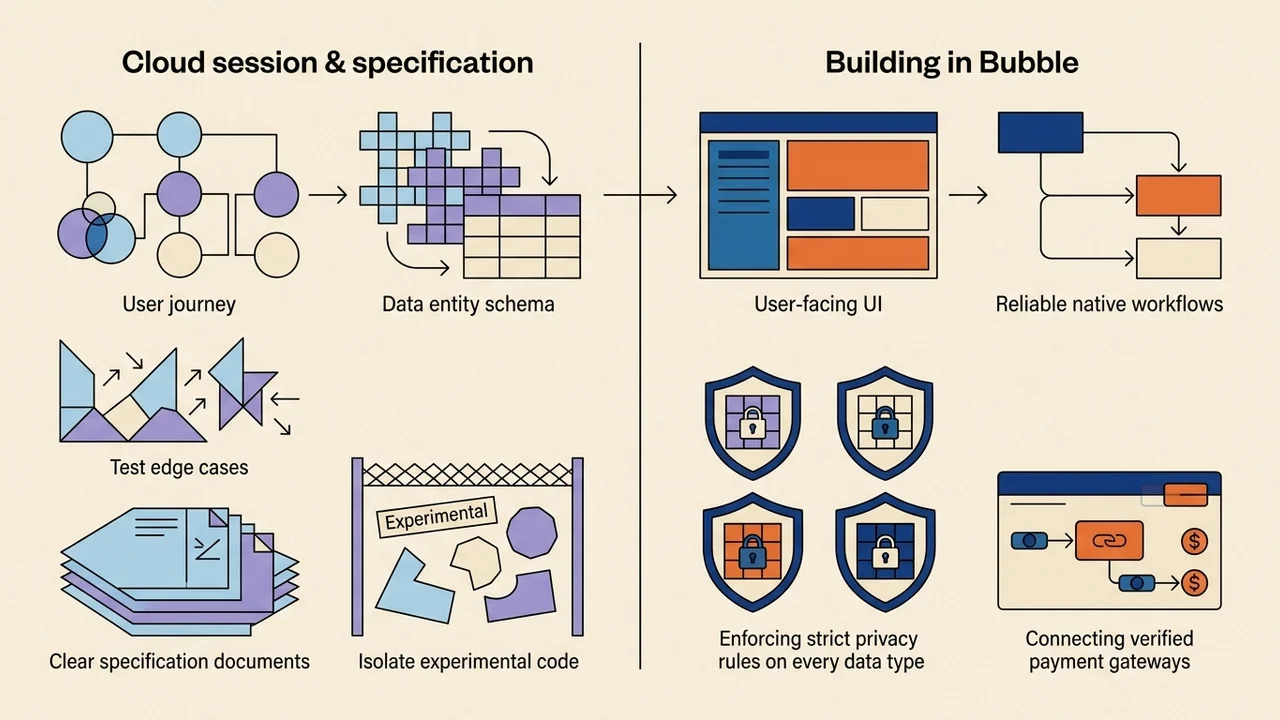
- In the cloud environment (Codex / Agents API): sketch user journeys, draft data entity schemas, stress-test logic edge cases, write clear specification documents, and evaluate experimental code in isolation.
- By hand in Bubble: assemble the user-facing UI, configure reliable native workflows, enforce strict Privacy Rules on every data type, and connect verified payment gateways like Stripe.
| Environment | What it is for |
|---|---|
| Cloud (Codex / Agents API) | Sketch user journeys |
| Cloud (Codex / Agents API) | Draft data entity schemas |
| Cloud (Codex / Agents API) | Stress-test logic edge cases |
| Cloud (Codex / Agents API) | Write clear specification documents |
| Cloud (Codex / Agents API) | Evaluate experimental code in isolation |
| Bubble | Assemble the user-facing UI; configure reliable native workflows; enforce strict Privacy Rules on every data type; connect verified payment gateways like Stripe |
By treating OpenAI's new surfaces as a dedicated workbench for thinking and drafting—while keeping Bubble as the secure, deterministic home for your users' data—you get the speed of vibe-coding without sacrificing the stability needed to earn early customer trust and investor interest.